
Basic Multithreading in C++ With a Hint of OpenCV
Some people, when confronted with a problem, think “I know, I’ll use multithreading”. Nothhw tpe yawrve o oblems. – @d6 https://dev.to/henrikwarne/more-good-programming-quotes-part-2-1o05

Article GitHub link:
https://github.com/mday299/keypuncher/tree/main/C%2B%2B/Intermediate/Threading/basic
Feedback? Email mailto:mday299@pm.me
Article Summary
Introduction
Threading Building Blocks
Example 1: Simple Multithreaded Operations
Example 2: Queues, Mutexes, and Semaphores
Installing OpenCV
Example 3: Simple OpenCV Image Pipeline
Conclusion
Credits
Bonus
Introduction
The concept of parallelization (see wikipedia) and threading has been around since the around the mid-1960’s but it was not officially called threading in most circles until around the late 80s. This is separate from multiprocessing which you can read about at difference-between-multiprocessing-and-multithreading/.
Early threading standards included POSIX, Win32, OpenMP, Go Goroutines (see go.dev), and C++11 std::thread. We are going to cover that last one in this article. As this article is meant to cover just std::thread, it will not cover advanced threading concepts such as those available at std::async and std::future, nor coroutines available starting with C++20 such as co_await, and coroutines.
This code for this article was tested on Ubuntu 24.04 with OpenCV version 4.6.0.
Threading Building Blocks
Every C++ program starts with a main thread or the one that runs the main function. When you create new threads via std::thread, they run alongside the main thread. The main thread can then continue doing work while other threads run in parallel.
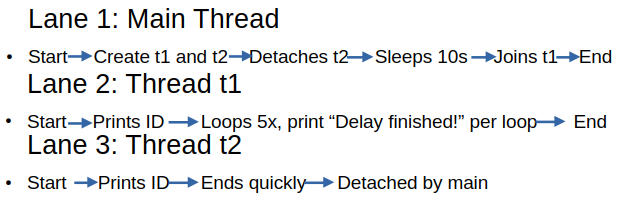
Threading Lanes
A visual representation of the 3 threading lanes for Example 1:
Join
Calling join means the main thread waits until the child thread finishes.
- If you don’t join or detach a thread before the program ends, the runtime will throw an error (because the thread is still “joinable”).
Example:
t1.join();Detach
Calling detach means the thread runs independently and the main thread no longer tracks it.
- Once detached, you cannot join it later!
- Useful for background tasks that don’t need synchronization with the main thread.
Insight: Think of the main thread as the “manager.”
- Join is like waiting for a worker to finish before moving on.
- Detach is like telling a worker “do your thing, I won’t check back.”
Proper thread management is critical! Forgetting to join or detach leads to runtime errors.
Example 1: Simple Multithreaded Operations
Where I started: geeksforgeeks.org.
Threading can absolutely interleave outputs! I have endeavored to provide random delays to make this example as realistic as possible. Please run it at least a few times to get a feel for how the interlacing works.
Without further adieu, here is a basic mulithreading application in modern C++ (save it as, e.g., multithreaded.cpp or similar).
#include <iostream> // Standard C++ I/O
#include <thread> // std::thread class
#include <chrono> // Time utilities like std::chrono:seconds

// Task function executed by thread t1
void task1() {
  int i = 0;
  // Print the thread ID (unique identifier assigned by the OS)
  std::cout << "Thread 1 is running. ID: " << std::this_thread::get_id() << "\n";

  //Loop 5 times
  while (i < 5) {
  //Pause execution of this thread for 1 second
  std::this_thread::sleep_for(std::chrono::seconds(1));

  // After waking up, print a message
  std::cout << "Delay finished!" << std::endl;
  // Be sure to increment i or you will loop forever
  i++;
  }
}

// Task function executed by thread t2
void task2() {
  // Print the thread ID
  std::cout << "Thread 2 is running. ID: " << std::this_thread::get_id() << "\n";
}

int main() {
  // Create two threads: t1 runs task1, t2 runs task2
  std::thread t1(task1);
  std::thread t2(task2);

  // Print thread IDs from the main thread’s perspective
  std::cout << "t1 ID: " << t1.get_id() << "\n";
  std::cout << "t2 ID: " << t2.get_id() << "\n";

  // If t2 is joinable, detach it
  // Detach means t2 runs independently; main thread will not wait for it
  if (t2.joinable()) {
    t2.detach();

    //sleep in main thread for 10 seconds and make sure t1 gets along a ways
    std::this_thread::sleep_for(std::chrono::seconds(10));

    std::cout << "t2 detached\n";
  }

  // If t1 is joinable, join it
  // Join means main will block until t1 finishes its loop
  if (t1.joinable()) {
    t1.join();
    std::cout << "t1 joined\n";
  } else {
    std::cout << "There seems to be a problem. Thread is not joinable" <<
      std::endl;
  }

  // Sleep briefly to ensure detached thread output completes.
  std::this_thread::sleep_for(std::chrono::milliseconds(100));

  std::cout << "Main thread finished.\n";

 return 0;
}
Compile this code with
g++ multipleThreads.cpp
and then run it via:
./a.out
It should run for about 10 seconds and should result in something like:
t1 ID: Thread 2 is running. ID: 132189056399040132189048006336
t2 ID: 132189048006336
Thread 1 is running. ID: 132189056399040
Delay finished!
Delay finished!
Delay finished!
Delay finished!
Delay finished!
t2 detached
t1 joined
Main thread finished.
What’s happening?
The main thread starts and creates 2 more threads. Thread 1 runs task1 which is a loop with delays and t2 just prints its thread ID.
Thread 2 (t2)
Runs task2 which prints “Thread 2 is running. ID: <some number>”.
- Main thread sees
t2is joinable, so it detaches it. Detach means t2 is no longer controlled by main; it runs independently and cannot be joined later. - Main thread then sleeps for 10 seconds to give
t1time to progress. - Prints “
t2 detached”.
Thread 1 (t1)
Runs task1 which prints: Thread 1 is running. ID: <some number>
- Enters a loop 5 times:
- Sleeps for 1 second.
- Prints
"Delay finished!".
- This produces 5
"Delay finished!"lines spaced ~1 second apart. - After the loop,
task1ends.
Main thread (after 10s sleep)
- Calls
t1.join(). - Since
t1is still running (or just finished), join waits until it completes. - Prints
t1 joined.
Program end
- Sleeps briefly (100 ms) to ensure detached thread output is flushed.
- Prints
Main thread finished.Exits.
Congratulations, you just successfully did multithreaded C++!
Bonus exercise: fiddle around with the random timings and delays and see how the program responds.
Example 2: Queues, Mutexes, and Semaphores
The following code was provided with assistance from Microsoft CoPilot.
Note: I was using cv.notify_one instead of cv.notify_all when I first wrote this. See: geeksforgeeks and cppreference.com for why this probably isn’t a good idea for this particular case.
The following models a Producer-Consumer documented at National Instruments and wikipedia.org. I’ve endeavored to model the following:
- Input thread: models a producer that generates tasks/messages (like sensor readings, network packets, or user requests).
- Processing threads: model workers that consume tasks, transform them, and push results forward.
- Output thread: models a consumer that takes finished work and delivers it (like logging, sending to a client, or writing to disk).
- Mutex: ensures safe access to shared queues and flags. This prevents race conditions. See std-mutex-in-cpp.
- Condition variable: models signaling/waiting, so threads sleep until new work arrives instead of busy‑spinning.
- A Semaphore models a limited resource pool (capacity = 2). Think of it as two “slots” for a scarce resource (like database connections or file handles). Only two threads can use it at once. See cpp-20-semaphore-header.
- Critical section models a shared counter or state that must be updated atomically (see Atomic_commit), demonstrating how multiple threads coordinate when touching a single variable. See also Critical_section.
A real world analogy would be a factory line:
- Input thread = raw materials arriving.
- Processing threads = workers assembling parts.
- Output thread = packaging/shipping.
- Semaphore = maximum of only two machines available at once.
- Mutex/condition variable = workers coordinate so they don’t grab the same part simultaneously.
This system is meant to demonstrate concurrency control. Multiple threads can safely share data, coordinate work, and respect resource limits. It mirrors the design patterns used in operating systems, servers, and embedded pipelines.
Save this code as, e.g., queuingTest.cpp or similar:
#include <iostream> // Standard C++ I/O
#include <thread> // std::thread for concurrency
#include <queue> // std::queue for message buffers
#include <mutex> // std::mutex for synchronization
#include <condition_variable> // std::condition_variable for signaling
#include <string> // std::string for message content
#include <chrono> // std::chrono for timing
#include <cstdlib> // rand() for random delays
#include <semaphore> // C++20 standard counting_semaphore

// Shared queues between threads
std::queue<std::string> rawQueue; // Holds input messages before processing
std::queue<std::string> processedQueue; // Holds processed messages before output

// Synchronization primitives
std::mutex mtx; // Protects access to queues and flags
std::condition_variable cv; // Signals when new work is available
bool inputDone = false; // Flag: input thread finished
bool processingDone = false; // Flag: all processing threads finished
int activeProcessors = 0; // Count of currently active processing threads

// Critical section variables
int criticalCounter = 0; // Shared counter incremented in critical section
std::mutex criticalMtx; // Protects criticalCounter

// Semaphore guarding arbitrary limited resource (capacity = 2)
std::counting_semaphore<2> resourceSem(2);

// -------------------- Input Thread --------------------
void inputThread() {
  for (int i = 0; i < 10; ++i) {
    {
      // Lock mutex before pushing into rawQueue
      std::lock_guard<std::mutex> lock(mtx);
      rawQueue.push("Message " + std::to_string(i));
    }
  // Notify processors that new data is available
  cv.notify_all();
  // Random stagger to simulate irregular input arrival
  std::this_thread::sleep_for(std::chrono::milliseconds(50 + rand() % 400));
  }

  // After all messages are pushed, mark input as done
  std::lock_guard<std::mutex> lock(mtx);
  inputDone = true;
  cv.notify_all();
}

// -------------------- Processing Thread --------------------
void processingThread(int id) {
  {
    // Increment active processor count when thread starts
    std::lock_guard<std::mutex> lock(mtx);
    activeProcessors++;
  }

  while (true) {
    std::unique_lock<std::mutex> lock(mtx);
    // Wait until rawQueue has data or input is finished
    cv.wait(lock, [] { return !rawQueue.empty() || inputDone; });

    if (!rawQueue.empty()) {
      // Pop one message from rawQueue
      std::string msg = rawQueue.front();
      rawQueue.pop();
      lock.unlock(); // Release lock while processing

      // Acquire semaphore before using resource
      resourceSem.acquire();

      // Critical section: increment shared counter
      {
        std::lock_guard<std::mutex> critLock(criticalMtx);
        criticalCounter++;
        std::cout << "Thread " << id
          << " entered critical section. Counter = "
         << criticalCounter << std::endl;

        // Random jitter inside critical section
        std::this_thread::sleep_for(std::chrono::milliseconds(rand() % 200));
      }

      // Simulate heavy processing with random delay
      std::this_thread::sleep_for(std::chrono::milliseconds(100 + rand() % 1500));
      msg = "[Processed by " + std::to_string(id) + "] " + msg;

      // Push processed message into processedQueue
      std::lock_guard<std::mutex> lock(mtx);
      processedQueue.push(msg);
      cv.notify_all();

      // Release semaphore after resource use
      resourceSem.release();
    } else if (inputDone) {
      break;
    }
  } //end while

  {
    // Decrement active processor count when thread finishes
    std::lock_guard<std::mutex> lock(mtx);
    activeProcessors--;
    // If all processors are done, mark processingDone
    if (activeProcessors == 0) {
      processingDone = true;
      cv.notify_all();
  }
  }
}

// -------------------- Output Thread --------------------
void outputThread() {
  while (true) {
    std::unique_lock<std::mutex> lock(mtx);
    // Wait until processedQueue has data or processing is finished
    cv.wait(lock, [] { return !processedQueue.empty() || processingDone; });

    if (!processedQueue.empty()) {
      // Pop one processed message
      std::string msg = processedQueue.front();
      processedQueue.pop();
      lock.unlock();

      // random delay before printing to simulate output jitter
      std::this_thread::sleep_for(std::chrono::milliseconds(100 + rand() % 1000));
      std::cout << msg << std::endl;
    } else if (processingDone) {
      // Exit loop if all processing threads are finished
      break;
    }
  }
}

int main() {
  srand(time(nullptr)); // Seed random number generator

  // Launch threads
  std::thread t1(inputThread);
  std::thread t2(processingThread, 1);
  std::thread t3(processingThread, 2);
  std::thread t4(processingThread, 3);
  std::thread t5(processingThread, 4);
  std::thread t6(outputThread);

  // Wait for all threads to finish
  t1.join();
  t2.join();
  t3.join();
  t4.join();
  t5.join();
  t6.join();

  // Print final critical counter value
  std::cout << "Final criticalCounter = " << criticalCounter << std::endl;

  return 0;
}
Once the code is entered build with:
g++ -std=c++20 queingTest.cpp -pthread
then run it with:
./a.out
This should produce something like the following output:
Thread 1 entered critical section. Counter = 1
Thread 2 entered critical section. Counter = 2
Thread 4 entered critical section. Counter = 3
Thread 3 entered critical section. Counter = 4
[Processed by 1] Message 0
[Processed by 2] Message 1
Thread 3 entered critical section. Counter = 5
Thread 4 entered critical section. Counter = 6
[Processed by 3] Message 3
Thread 4 entered critical section. Counter = 7
Thread 3 entered critical section. Counter = 8
[Processed by 4] Message 2
[Processed by 4] Message 7
[Processed by 3] Message 6
Thread 2 entered critical section. Counter = 9
Thread 1 entered critical section. Counter = 10
[Processed by 3] Message 9
[Processed by 4] Message 8
[Processed by 2] Message 5
[Processed by 1] Message 4
Final criticalCounter = 10
And done! You've successfully created a realistic queuing scenario!
Install OpenCV
The following instruction are provided for installing OpenCV on their website:
Windows:
https://docs.opencv.org/4.13.0/d3/d52/tutorial_windows_install.html
Linux:
https://docs.opencv.org/4.13.0/d7/d9f/tutorial_linux_install.html
Mac:
https://docs.opencv.org/4.13.0/d0/db2/tutorial_macos_install.html
For myself, I’m on Ubuntu 24.04 and all that is required is to enter:
sudo apt install libopencv-dev
at a prompt. However as this is not meant to be an OpenCV tutorial it may not work for your particular environment.
Example 3: Simple OpenCV Image Pipeline
Image processing is computationally heavy, and multithreading helps in several ways:
- Parallel filters: Different threads can apply separate filters (blur, edge detection, color transforms) simultaneously.
- Tile-based processing: Large images can be split into regions, each processed by a different thread, then recombined.
- Responsiveness: In GUI apps, one thread handles the interface while worker threads process images in the background, preventing freezes.
- Real-time pipelines: In robotics, medical imaging, or video streaming, threads can handle capture, preprocessing, and display concurrently.
The following code was provided with assistance from Microsoft CoPilot.
Save the following as, for example, openCV_pipeline.cpp or similar:
#include <opencv2/opencv.hpp> // Core OpenCV functionality
#include <iostream> // Standard C++ I/O for error messages and logging

int main() {
  // Step 1: Load image from file
  // cv::imread reads an image into a cv::Mat object.
  // "openCV-sample.png" must exist in the working directory.
  cv::Mat input = cv::imread("openCV-sample.png");
  if (input.empty()) {
    std::cerr << "Error: Could not load image!" << std::endl;
    return -1;
  }

  // Step 2: Convert to grayscale
  // cv::cvtColor transforms the color space of the image.
  // Here, we convert from BGR (default OpenCV format) to grayscale.
  cv::Mat gray;
  cv::cvtColor(input, gray, cv::COLOR_BGR2GRAY);

  // Step 3: Apply Gaussian blur
  // cv::GaussianBlur smooths the image, reducing noise and detail.
  // Kernel size (7x7) and sigma (1.5) control the strength of the blur.
  cv::Mat blurred;
  cv::GaussianBlur(gray, blurred, cv::Size(7, 7), 1.5);

  // Step 4: Edge detection (Canny)
  // cv::Canny detects edges by looking for intensity gradients.
  // Thresholds (50, 150) control sensitivity:
  // - Lower threshold: potential edges
  // - Upper threshold: strong edges
  cv::Mat edges;
  cv::Canny(blurred, edges, 50, 150);

  // Step 5: Display results in separate windows
  // cv::imshow creates a window and shows the image.
  cv::imshow("Original", input);
  cv::imshow("Grayscale", gray);
  cv::imshow("Blurred", blurred);
  cv::imshow("Edges", edges);

  // Main loop:
  while (true) {
    int key = cv::waitKey(30);

    // If all windows are closed, exit
    if (cv::getWindowProperty("Original", cv::WND_PROP_VISIBLE) < 1 &&
        cv::getWindowProperty("Grayscale", cv::WND_PROP_VISIBLE) < 1 &&
        cv::getWindowProperty("Blurred", cv::WND_PROP_VISIBLE) < 1 &&
        cv::getWindowProperty("Edges", cv::WND_PROP_VISIBLE) < 1) {
      break;
    }
  }

  return 0;
}
Once the code is entered, make sure the openCV-sample.png file is present, then compile with:
g++ openCV_pipeline.cpp `pkg-config --cflags --libs opencv4`
Then run it with:
./a.out
This should bring up the original image, a grayscale image, a blurred grayscale image, and a simple edge detector. Once finished, close all the resulting windows to end the program.
Conclusion
Congratulations you made it! You know the basics of C++ std::thread multithreading! You've done some simple multithreading, some things that a real production server does, and implemented an image pipeline.
Credits
https://en.cppreference.com/cpp/thread/thread
https://www.geeksforgeeks.org/cpp/multithreading-in-cpp/
https://stackoverflow.com/questions/266168/simple-example-of-threading-in-c
Bonus
For further information on multihreading in C++ see articles such as Multithreading_(computer_architecture) and List_of_C%2B%2B_multi-threading_libraries.
Pros and cons of multithreading
Pros
- Parallel speedup: Multithreaded programs can run tasks concurrently and achieve true parallelism on multi-core systems, improving performance for CPU-heavy workloads.
- Responsiveness: If you do it right, GUI apps and servers stay responsive because other threads continue running even if one blocks.
- Resource sharing: Threads share memory and files, enabling fast communication within a process.
- Scalability: Threads can be scheduled across multiple cores, improving throughput.
Cons
- Complexity: Requires careful design and synchronization; difficult to maintain over a long period.
- Race conditions: Shared memory access can cause nondeterministic bugs without proper locking. See race-condition-in-operating-systems.
- Deadlocks: Incorrect lock ordering can freeze the entire program. See Deadlock_(computer_science)
- Debugging difficulty: Timing-dependent bugs make diagnosis harder.
- Overhead: Thread creation, scheduling, and synchronization all have runtime costs.
Choose multithreading when:
- Workloads are parallelizable (image processing, ML, simulation).
- You need responsiveness (GUIs, web servers).
- Hardware has multiple cores you want to utilize.
Choose serial when:
- Tasks have strict sequential dependencies.
- You want maximum reliability and simplicity.