Tradeoffs of parallel processing in C++ -- std::thread vs NVIDIA CUDA
Code for this tutorial is on GitHub at: Intermediate/Threading/serialVsParallel
Email mailto:mday299@pm.me

Overview
Introduction, Setup, Code Samples, Credits, Tradeoffs
Introduction
Parallel processing in C++ can be approached in multiple ways. Among the more common are:
- CPU parallelism using
std::thread - GPU parallelism using NVIDIA CUDA
Both dramatically outperform serial execution, but each has different strengths, limitations, and hardware requirements. This article explores some of those tradeoffs using three parallel workloads. Code was tested on Ubuntu 24.04 with CUDA 11.8.
Setup
My video card is a bit dated so I’m limited to CUDA 11.8 and gcc-10. You may be able to install a later version of CUDA and gcc if your NVIDIA driver supports it.
Step 1: Install libpng and gcc-10.
Ubuntu:
sudo apt-get install libpng-dev
sudo apt-get install gcc-10 g++-10
Windows
One way to install libpng is to open up a cmd prompt and type:
vcpkg install libpng:x64-windows
Mac
One way to install libpng on Mac is with Homebrew:
brew install libpng
Code Samples
Again, the code for this tutorial is on GitHub at: Intermediate/Threading/serialVsParallel
Refer to g++ docs for how to build and run g++: (latest as of this writing: gcc-16.2.0/gcc/).
Refer to NVIDIA docs for how to build and run nvcc (docs.nvidia.com/cuda/).
All code samples below have a serial, a std::thread parallelized and a CUDA parallelized version. The expected performance order is Serial > std::thread > CUDA.
Feel free to play around with these examples! Try modifying vectors, matrices, threads, grids, blocks, etc. Note that you may have to reboot your machine if you get too ambitious with the memory allocation.
Code Sample 1: Vector Addition
Serial:
g++ serialVecAddHugeCircular.cpp -lpng -o serialVecAddHugeCircular
./serialVecAddHugeCircular
Parallel std::thread
g++ parallelVecAddHugeCircular.cpp -lpng -o parallelVecAddHugeCircular
./parallelVecAddHugeCircular
Parallel CUDA
nvcc -ccbin=/usr/bin/g++-10 cudaParallelGPU.cu -lpng -o cudaParallelGPU
./cudaParallelGPU
(g++-10, because I can’t do modern CUDA on my current machine)
Serial:
Code Sample 2: Matrix Multiplication
g++ serialMatrixMult.cpp -o serialMatrixMult
./serialMatrixMult
Parallel std::thread
g++ parallelMatrixMult.cpp -o parallelMatrixMult
./parallelMatrixMult
Parallel CUDA
nvcc -ccbin=/usr/bin/g++-10 cudaMatrixMult.cu -o cudaMatrixMult
./cudaMatrixMult
Code Sample 3: Monte Carlo Pi Estimate
See estimating-value-pi-using-monte-carlo/ for an explanation of Monte Carlo Pi estimation.
Serial:
g++ serialMontePiEst.cpp -o serialMontePiEst
./serialMontePiEst
Note: this one can take a while on a slow machine! You may end up having to decrease the sample size.
Parallel std::thread
g++ parallelMontePiEst.cpp -o parallelMontePiEst
./parallelMontePiEst
Parallel CUDA
nvcc -ccbin=/usr/bin/g++-10 cudaMonteCarloPiEst.cu -o cudaMonteCarloPiEst
./cudaMonteCarloPiEst
Credits
Stanford Parallel Computing Course https://github.com/stanford-cs149/
Microsoft Copilot
Tradeoffs: Serialized vs std::thread vs NVIDIA CUDA.
Serial execution. Predictable and simple.
- One thread, one instruction stream.
- Easiest, most predictable, and great on small datasets.
- Perfect for correctness, debugging, and baseline performance.
- Performance grows linearly with dataset size.
- No synchronization, no race conditions, no memory‑transfer overhead.
- Does NOT scale to large datasets.
std::thread parallelism, moderate speedup, moderate complexity
- Multiple CPU threads.
- No GPU required. Easy to integrate into existing C++ code.
- Uses CPU cores, typically 4–32 on desktops/workstations.
- Great for parallel loops (Monte Carlo, matrix rows, image rows).
- Straightforward work partitioning: split work by rows, blocks, or sample ranges.
- Must handle things like:
- Work partitioning: partitioning-in-distributed-systems/
- Synchronization: Data_synchronization
- False sharing: False_sharing
- Cache locality: locality-of-reference-and-cache-operation-in-cache-memory/
Performance characteristics:
- Speedup limited by number of CPU cores.
- Memory bandwidth becomes the bottleneck for large matrices: dl-performance-matrix-multiplication/.
- Good for medium‑sized workloads.
Use std::thread when:
- You want parallelism without GPU complexity
- CPU has many cores
- Dataset fits comfortably inside the CPU cache
CUDA: GPU parallelism, massive speedup, highest complexity
Launches tens of thousands of threads.
Ideal for:
- Math heavy workloads like matrix multiplication
- Monte Carlo sampling
- Image convolution: Kernel_(image_processing)
- Any SIMD‑friendly workload: Single_instruction,_multiple_data
Performance characteristics:
- GPUs have orders of magnitude more parallel units.
- Memory bandwidth is extremely high.
Use CUDA when:
- Dataset is huge.
- Workload is parallel
- You need real‑time or near‑real‑time performance
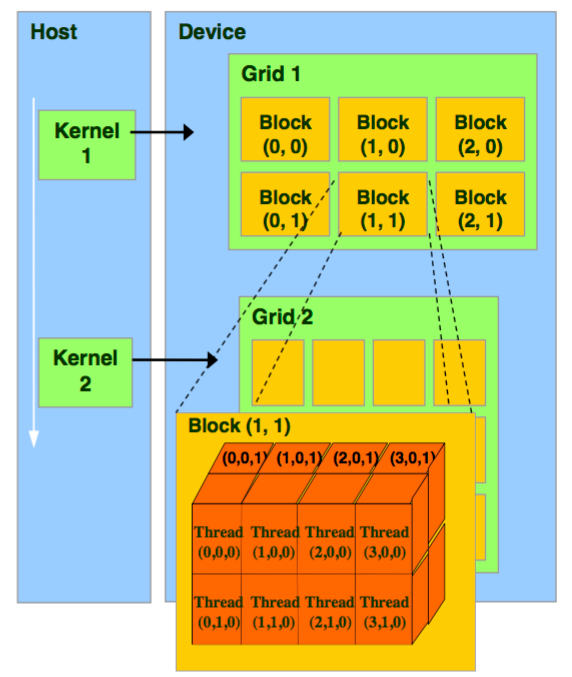
The CUDA Hierarchy
- Thread The smallest unit of execution. Each thread runs the kernel code on one piece of data (for example, one pixel or one matrix element).
- Block A group of threads. Threads inside a block can cooperate by sharing data in shared memory and synchronizing with each other.
- Blocks are usually 1D, 2D, or 3D arrays of threads.
- Example:
dim3 threadsPerBlock(16, 16)→ a block with 256 threads arranged in a 16×16 grid.
- Grid A collection of blocks. The grid defines the overall shape of the computation.
- Grids can also be 1D, 2D, or 3D arrays of blocks.
- Example:
dim3 numBlocks(64, 64)→ a grid with 4096 blocks.
How threads are identified
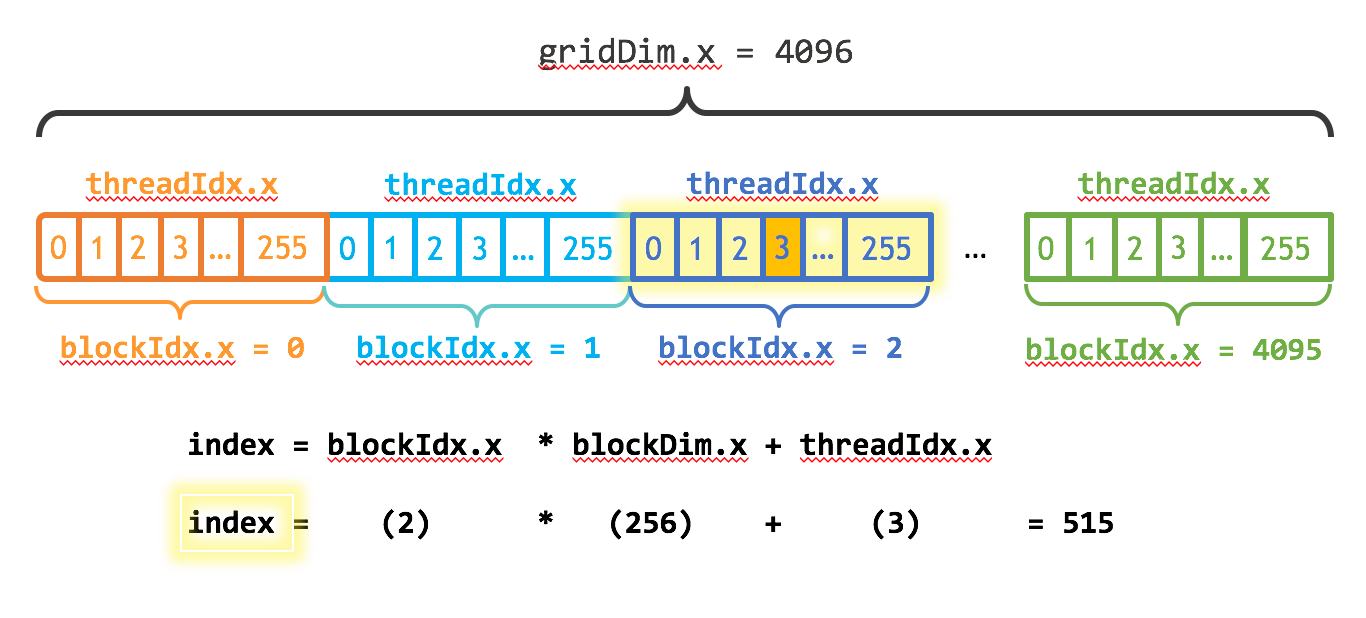
Each thread has a unique global ID computed from its block and thread indices:
int globalX = blockIdx.x * blockDim.x + threadIdx.x;threadIdx: thread’s index inside its blockblockIdx: block’s index inside the gridblockDim: number of threads per blockgridDim: number of blocks per grid
This mapping lets you assign each thread to a specific element in your data structure (like a pixel in an image or an entry in a matrix). The following image may be helpful:
Example: 1000×1000 matrix multiplication
- Threads per block:
(16, 16)= 256 threads per block - Blocks per grid:
(63, 63)= enough blocks to cover 1000×1000 elements - Total threads launched:
63*16 × 63*16 ≈ 1,016,064threads
Each thread computes one element of the result matrix.
This image may also help: